
Use this dialog box to add notes to packets, parts, and documents.
 Options and Field Descriptions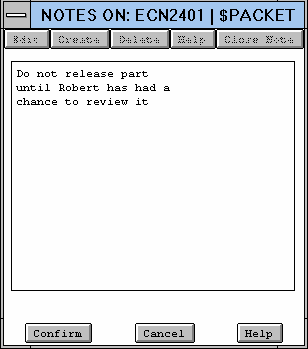
Figure Caption:
Packet Notes Dialog Box.
| Options and Field Descriptions |
|---|
| Find - Finds parts based on a database query that corresponds with entries in the query restriction edit fields. Wildcards are allowed in these query fields. |
| Edit - Enables you to edit the note that appears in the text field. |
| Create - Creates a new note and changes to the edit mode. |
| Delete - Deletes notes. Notes are permission-free, so anyone can delete them. If you need to create a permanent note, add it to the packet or part as a document. |
| Help - Accesses the help for this dialog box. |
| Close Note - Closes the Notes dialog box. |
| Previous - Displays the previously selected note. |
| Next - Displays the next note. |
| Confirm - Accepts the note and adds it to the packet. |
| Cancel - Cancels the note operation. |
| Help - Accesses the help for this dialog box. |
Questions about ECC ??? Send e-mail to
support@integware.com