PART

Part Window - Documents View

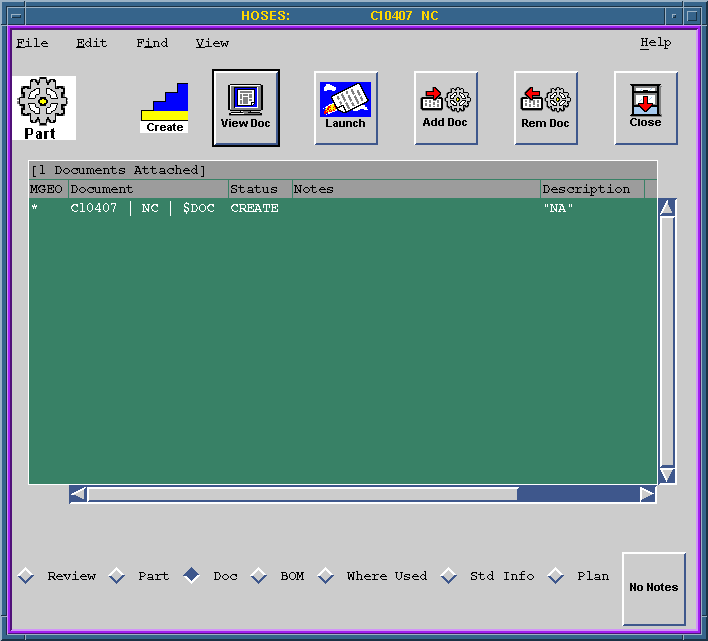
This view shows the documents attached to this part, such as drawings that specify this part.

  1. For a description of the fields that you can view or edit in this view, see:
    *Field Descriptions
  2. For a listing of all the commands available in this view, see:
    *Menu Commands
  3. For a description of the icons available in this view, see:
    *Icon Descriptions


Figure Caption: Part Documents View.

Field Descriptions

  1. The MGEO (Master Geometry) field indicates whether the document is the MGEO for the selected part by displaying '*'. Only one document should be the MGEO.
  2. The Document field lists the document number that ECC assigned when the document was created.
  3. The Status field indicates whether the document is in the CREATE, REVIEW, RELEASED, or OBSOLETE state.
  4. You can edit Notes by double clicking the document name and using the Modify icon in the Document Window.
  5. The Description field contains specific information about the document.
  6. To add or remove documents using the Add and Remove Documents icons, see:
  7. *Document View Icons

Menu Commands

The following pull-down menu options are available in this view:

File Edit Find View Help
Open
Close
Print
Print Table
Print BOM
Ready for Review
Reserve
Unreserved
Import
Export
Launch App
View
Open Parent Packet
BOM Quantity Compare
Create ->
- Part
- Authorization Packet
- Note Pad
- Document
- Pre-authorized Packet
Copy
Revise
Delete from Database
Copy & Replace
Revise & Replace
Add Document
Add Doc by Number
Remove from Part
Set MGEO
Remove MGEO
Part...
Part by number...
Document...
Packet...
Review
Part
Document
BOM
Where Used
Std Info
Plan
Graphical BOM
Tabular BOM
Open
Hints

Icon Descriptions

Clicking an icon implements its commands:

View Document
- Implements the File/View command for viewing the document. You can create and save notes with the document.

Launch Application
- Implements the File/Launch App command for editing the document in an application.

Add Document
- Implements the Edit/Add Document command for modifying the contents of the window.

Remove Document
- Implements the Edit/Remove Document command.

Close Window
- Implements the File/Close command.


Questions about ECC ??? Send e-mail to support@integware.com